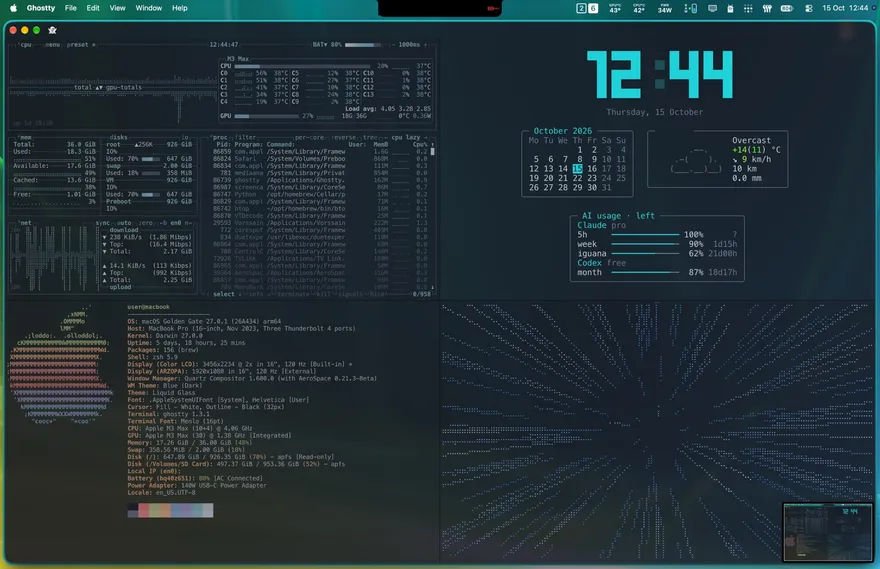
I always liked how i3wm looks on Linux: windows snap into a grid, everything is driven by the keyboard, and the desktop looks like a hacker movie. I’m on a Mac, though, so I faked it. FYI, here’s how it all works.
The three pieces#
- AeroSpace is the tiling window manager. Every new window takes its share of the screen with 8px gaps, so nothing overlaps and I never drag a window around.
- Ghostty is the terminal. It’s Menlo 16pt with the Iceberg Dark theme, 85% opacity and a blur, so the wallpaper glows through. VISTA WALLPAPER BTW!!! THE GOAT!
- borders draws a teal outline around the focused window. Without it I lose track of where I’m typing.
Keyboard only#
Everything is on ⌥ (Option), the same way i3 uses its mod key:
- ⌥1–6 jumps to a workspace, and ⌥, / ⌥. steps to the previous/next one
- ⌥[-] moves focus, and ⌥⇧1-6 moves the window itself
- ⌥Enter opens a terminal, and ⌥D splits it, just like Ghostty’s own splits
- ⌥S / ⌥O / ⌥P / ⌥G open Safari, Obsidian, Claude Projects and Steam
- ⌥W closes the window
Workspace 6 is the dashboard#
The screenshot above is workspace 6. When I hit ⌥6, a small script opens one Ghostty window and splits it into four:
- btop for CPU, GPU, memory, disks, network and processes
- fastfetch for the specs, aka the bragging part
- a Python widget with a big pixel clock, a calendar, the weather from wttr.in, and how much of my Claude and Codex limits I have left
- a jump to lightspeed, Star Wars style, drawn in braille dots animatiopn. And it’s my favourite pane. The best morale booster, especially when you’re high on caffeine and just need something to hit your dopamine even further, without needing to scroll through corporate feeds on social media
It also builds itself at login, so the Mac boots straight into it.
It took just an hour or so, and now my Mac feels like truly mine. Thinking about swapping the menu bar now.
Oh, btw, Claude CLI can set this all up for you, just point it at this post and it will help you right away.